How to track all your AI coding agents in one place
2026-11-14 · 3 min read
A notification tells you an agent finished. With Claude Code in one tab, Codex in another and Cursor on the side, banners time out and stack, and where a click lands depends on the terminal and how the banner was made. In Ghostty, a banner the terminal makes itself focused the right split in our test. In tmux it never picks the pane. back2vibing puts every agent session on one Session Rail and, with Pro, jumps to the exact tab or pane.
- Banners time out and stack. Where a click lands depends on the terminal; in tmux it cannot pick the pane.
- The Session Rail lists every agent session with a status, whatever agent or terminal it runs in.
- Free tier: status and notifications. Pro: return to the exact tab, split or pane.
Per-tool setups break when the stack changes
A hook for one agent, a plugin for one terminal, a tmux status line for the panes. Each works until you add the next agent or switch terminals.
Even when they work, a notification says something finished. Where a click takes you depends on the terminal and how the banner was made.
One tab per session
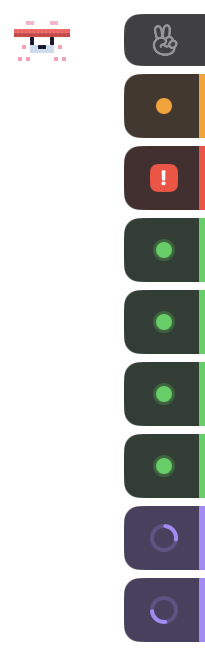
The Session Rail is a compact card on a screen edge, with one tab per agent session, grouped by workspace. Every agent gets the same states.
- Needs you: amber dot, pulsing.
- Working: purple spinner.
- Ready: green dot.
- Blocked: red "!".
- Idle: no highlight.
Agents and terminals
The agent support docs list lifecycle integrations for 13 agents. Run them normally or through `b2v <agent>`.
| Area | Covered |
|---|---|
| Agents | Claude Code, OpenAI Codex, Cursor, Sourcegraph Amp, Hermes, JCode, OpenCode, Gemini CLI, Kiro, Pi, Oh My Pi, GitHub Copilot, Antigravity |
| Exact tab or pane return (Pro) | Ghostty, iTerm2, cmux, WezTerm, kitty, Warp, Apple Terminal, Orca, the Herdr app, tmux, Zellij |
| Window-level return (Pro) | Alacritty |
| Desktop apps | Cursor Desktop (install the Cursor bridge from the Agents page for the exact session); Pro returns to a Codex Desktop thread and a Conductor workspace |
Free tier and Pro
The free GUI tier keeps every session visible, with status in the rail and Dock, a completion sound and macOS notifications. It notifies. It does not move your keyboard.
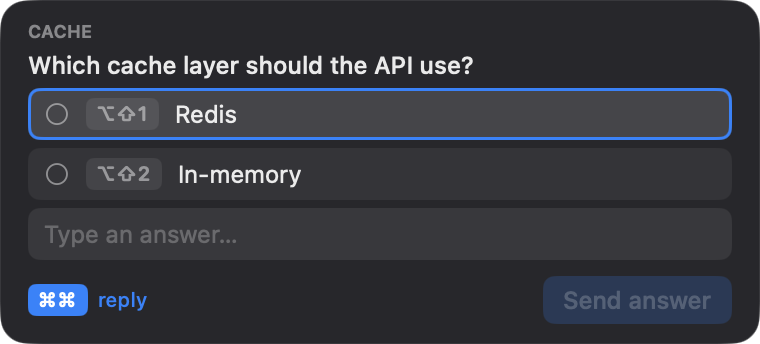
Pro returns you to the session. Command-Return jumps to the next agent that needs you. Option+1 to 9 peeks a numbered session without moving focus.
| Free GUI tier | Pro | |
|---|---|---|
| Status in rail and Dock | Yes | Yes |
| Sound and macOS notifications | Yes | Yes |
| Return to exact tab or pane | No | Yes |
| Flyouts, inbox, chat | No | Yes |
SSH and tmux
With Pro, tmux sessions return to the exact pane. For a remote host, add it under Settings, Remote and click Add & Connect. back2vibing installs the event forwarder, and remote events trigger chimes, notifications and flyouts on your Mac. Clicking one switches you to your local SSH terminal session.
When one agent in one terminal is enough
Built-in notifications or a hook script may be all you need. The rail pays off as agents, terminals and machines multiply.
Open Agents in the app to check an integration shows Active, then send a short prompt and switch away. back2vibing has a 14-day Pro trial; Pro is a one-time $19 lifetime purchase.
Try back2vibing
Every new install includes a 14-day Pro trial, and Pro is a one-time $19 lifetime license.
$
brew tap builtby-win/back2vibing https://github.com/builtby-win/back2vibing && brew install --cask back2vibing Install via Homebrew macOS
Frequently asked questions
Which AI coding agents can back2vibing track?
Claude Code, OpenAI Codex, Cursor, Sourcegraph Amp, Hermes, JCode, OpenCode, Gemini CLI, Kiro, Pi, Oh My Pi, GitHub Copilot and Antigravity. The Agents page shows which are Active.
Do I have to change my terminal?
No. Run agents where you already do. Pro returns you to exact tabs or panes in terminals such as Ghostty, iTerm2, WezTerm, kitty, Warp, tmux and Zellij.
Does it work over SSH?
Yes, with Pro. Add the host under Settings, Remote. Remote events notify you on your Mac, and clicking one switches you to your local SSH terminal session.
What do I get without paying?
Every session and its status in the rail and Dock, a completion sound and macOS notifications. Returning to a session is Pro.
What about a brand-new agent?
It needs a lifecycle integration first, so it appears once it is on the supported list in the docs.
Keep reading
- How to run multiple Claude Code agents at once
- Parallel coding agents without losing context
- The best tools for managing multiple AI coding agents
- The best terminal setup for AI coding agents
- Stop watching terminal spinners
- Run many agents with one Session Rail
- back2vibing alternatives
- back2vibing for Claude Code
- back2vibing for Codex
- back2vibing for Gemini CLI
- back2vibing for OpenCode
- back2vibing for Cursor
- Track agents over SSH
- Pricing
- Supported agents and apps
- Session Rail docs