How to run multiple Claude Code agents at once
2026-11-14 · 4 min read
With three agents running, a notification fires and you still have to find the right session. Where a click lands depends on the terminal and how the banner was made, and many sessions across terminals make that hunt costly. Here is a setup that avoids it.
- Give each agent its own checkout so they do not collide.
- Watch status on one rail instead of polling terminals.
- Free tier notifies you. Pro returns you to the exact tab or pane.
Where parallel agents break
A second agent turns dead waiting time into work. The problem is you. Each agent adds a tab, split, or window, and when one finishes nothing tells you which.
Notifications tell you something happened. Where a click lands depends on the terminal and how the banner was made. In our Ghostty test, a banner the terminal made itself focused the right split. In tmux a click never picks the pane. We did not test banners from hooks or scripts.
Step 1: one checkout per agent
Two agents in one working directory overwrite each other. A back2vibing workspace gives each task its own Git worktree and branch. Your Home Repo stays free, and new workspaces branch from the default branch.
Pick who creates the worktree under Settings, Workspaces: back2vibing, Conductor, Herdr, or Orca. The rail tracks the agents either way. Creating workspaces is free.
| Goal | Quick-pick key |
|---|---|
| New lane of work | n |
| Add a reviewer to an existing workspace | t |
| Try another approach from the same state | f |
Step 2: start agents where you already work
Run the agent in your usual terminal, or start it with b2v and the agent name for explicit tracking. Open Agents in the app and check each integration reads Active. Use the repair action if it says Needs setup.
Under Settings, Launch, choose the terminal and whether extra agents open as tabs, windows, or splits. A multiplexer (tmux, Zellij, Herdr) also works.
Step 3: read status from the rail
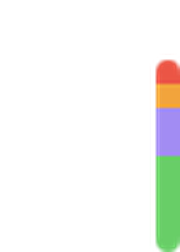
The Session Rail has one tab per session, grouped by workspace. The color tells you whether to bother.
| Look | Meaning |
|---|---|
| Amber, pulsing | Needs you: a question or permission request |
| Purple spinner | Working |
| Green dot | Finished with a new response |
| Red exclamation mark | Blocked or failed |
| No highlight | Idle |
Step 4: go back to the right place
Option+Space opens the rail in keyboard mode. Press a number for the workspace, j and k for the session, Enter to open it.
Returning to a session at all, whether the application, tab, or exact pane, is Pro. Command+Return jumps to the next agent that needs you. Pro reaches exact tabs or panes in Ghostty, iTerm2, cmux, WezTerm, kitty, Warp, Apple Terminal, Orca, the Herdr app, tmux, and Zellij.
The free tier still shows every session and its status, and it notifies you. It never moves your keyboard.
Answer small questions in place
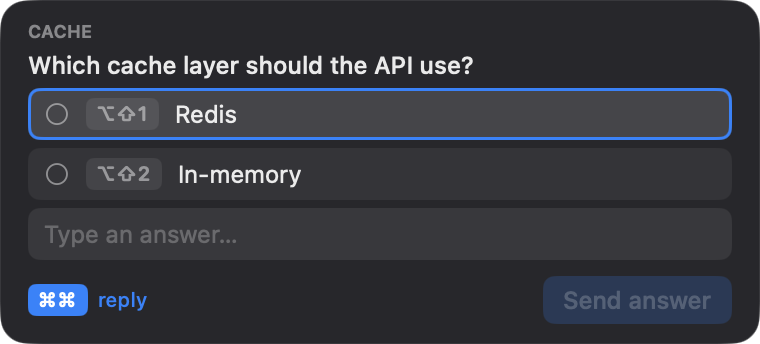
When an agent asks a question, a flyout appears beside its tab with the options and a field for your own answer. Often the answer is one line, so you never need to go back.
Try back2vibing
Every new install includes a 14-day Pro trial, and Pro is a one-time $19 lifetime license.
$
brew tap builtby-win/back2vibing https://github.com/builtby-win/back2vibing && brew install --cask back2vibing Install via Homebrew macOS
Frequently asked questions
Can I run multiple Claude Code agents on the same repository?
Yes, if each gets its own checkout and branch. A back2vibing workspace creates one per task while your Home Repo stays free.
How do I know which agent needs me?
Look at the Session Rail. Amber means waiting on you, purple working, green finished, red blocked or failed. With Pro, Command+Return jumps to the next agent that needs you.
Do I need a new terminal?
No. Run Claude Code in the terminal you already use. Pro returns to the exact tab or pane in the supported terminals.
Does this work with other agents?
Yes. Claude Code, OpenAI Codex, Cursor, Gemini CLI, OpenCode, GitHub Copilot, and others share one rail.
What is free?
The free tier shows every session and its status and sends notifications. New installs get a 14-day Pro trial. Returning to a session is Pro.