Stop watching terminal spinners
2026-11-14 · 3 min read
You watch the spinner because looking away feels risky. A notification helps, but banners time out and stack, and where a click lands depends on the terminal and how the banner was made. So you may still hunt for the right tab.
- Wait time: staring until the agent finishes. Notifications fix this.
- Find time: locating the right tab or pane afterward. A banner does not guarantee it, and it cannot pick a tmux pane.
- Free tier notifies. Pro returns you to the exact session.
Two kinds of lost time
Wait time is the time you spend watching a terminal. Find time is the time you spend working out which tab, window, or pane held the agent.
A completion sound that does not say where to go solves half of it. You still dig through tabs, often checking a few wrong ones first.
| Cost | What fixes it |
|---|---|
| Wait time | A signal outside the terminal: status color, sound, notification |
| Find time | A route to the exact session, tab, or pane |
What makes it safe to look away
You need to see state without opening anything, to be told which session needs you, and to get back without remembering where it lives.
The Session Rail gives one tab per session with a status color. Flyouts appear beside the session's tab, so the alert says which agent. Flyouts do not move your keyboard focus.
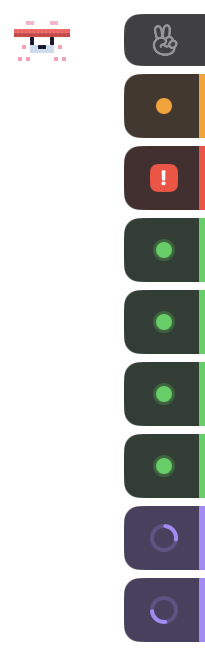
Supervise with a glance
Hide the rail down to a thin line. It is cut into one colored segment per agent, and hovering gives a summary such as 2 need you, 1 working, 1 ready.
Get back in one action
With Pro, Command+Return takes you to the next agent that needs you. Option+Space opens the rail for keyboard picking. Pro returns to exact tabs and panes in Ghostty, iTerm2, WezTerm, kitty, Warp, Apple Terminal, tmux, Zellij, and others.
For small questions you may not need to go back. A question flyout lists the options and has a field for your own answer.
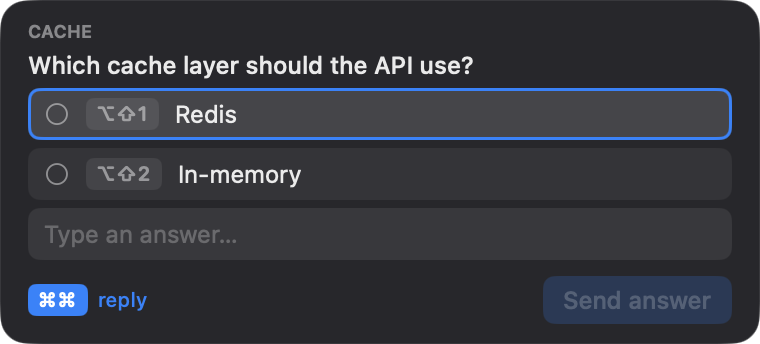
No new tools
back2vibing overlays the terminals and agents you already use. A new install includes a 14-day Pro trial, and the free tier keeps notifying afterward.
Try back2vibing
Every new install includes a 14-day Pro trial, and Pro is a one-time $19 lifetime license.
$
brew tap builtby-win/back2vibing https://github.com/builtby-win/back2vibing && brew install --cask back2vibing Install via Homebrew macOS
Frequently asked questions
Why do coding agents make me watch the terminal?
The terminal is the only place that shows progress, and looking away risks missing a question. Status and alerts outside the terminal remove that pressure.
What is the difference between wait time and find time?
Wait time is staring until the agent finishes. Find time is locating its tab or pane afterward. A notification fixes the first. Returning to the exact session fixes the second, and that is Pro.
Will back2vibing steal my keyboard focus?
No. The flyout is the alert and focus does not move on its own. You choose when to jump back.
Can I see status without opening a window?
Yes. The rail can shrink to a thin line with one colored segment per agent. Hover it for a summary.
Keep reading
- How to run multiple Claude Code agents at once
- Claude Code notifications when it finishes
- How to never lose a Claude Code tab
- Why agent notifications pile up
- Know when Claude Code finishes
- Claude Code notifications on Mac
- Switch between Claude Code sessions
- Session Rail docs
- Sound and dictation docs
- Pricing