Claude Code notifications when it finishes
2026-11-14 · 4 min read
Claude Code finishes. A notification appears. Where a click lands depends on your terminal and how the banner was made, and it is not guaranteed to be the session that finished. With several sessions across terminals, you end up hunting for the right one. Getting the notification is the easy part. Getting back to the exact session is what costs you time.
- Free: the terminal bell setting or a Notification/Stop hook tells you Claude Code is done.
- Where a click lands depends on the terminal and how the banner was made. It never picks a tmux pane.
- back2vibing free tier adds live status, a chime, and macOS notifications. Pro returns you to the exact session.
Free: the terminal bell
When Claude Code finishes or hits a permission prompt and you look away, it fires a notification event. What you see depends on your terminal.
Set preferredNotifChannel in ~/.claude/settings.json to force the bell. In Apple Terminal, also turn on Audible bell under Settings, Profiles, Advanced. Over SSH, set it to iterm2, kitty, or ghostty on the machine running Claude Code.
| Terminal | What you get |
|---|---|
| Ghostty, Kitty | Desktop notification |
| iTerm2 | Desktop notification, after you enable its alert settings |
| Apple Terminal | At most a silent bell |
| Others | Nothing, unless you set terminal_bell |
{
  "preferredNotifChannel": "terminal_bell"
}
Free: hooks
Hooks run a command when Claude Code reaches an event. Notification fires on permission prompts (after about six seconds) and idle prompts (after about 60 seconds). Stop fires the moment the main agent finishes responding, unless you interrupted it.
If osascript fails silently, run it once by hand and allow Script Editor under System Settings, Notifications. Type /hooks in Claude Code to confirm the hook is registered.
{
  "hooks": {
    "Notification": [
      {
        "matcher": "",
        "hooks": [
          {
            "type": "command",
            "command": "osascript -e 'display notification \"Claude Code needs your attention\" with title \"Claude Code\"'"
          }
        ]
      }
    ]
  }
}
Where both fall short
A bell is a sound. A hook fires once and is gone. Neither tells you which session it was.
Where a click lands depends on the terminal and how the banner was made. In our Ghostty test, a banner the terminal made itself from Claude Code's OSC 9 notification focused the right split. In tmux it never picks the pane, and plain OSC 9 is dropped unless allow-passthrough is on and the sequence is wrapped for tmux. We did not test banners made by hooks. You cannot answer a permission question from the banner either.
What back2vibing changes
back2vibing tracks Claude Code sessions and shows them on the Session Rail, one tab per session. When one finishes, you hear a chime and see its status change. When it needs input, a separate chime plays and the tab pulses amber.
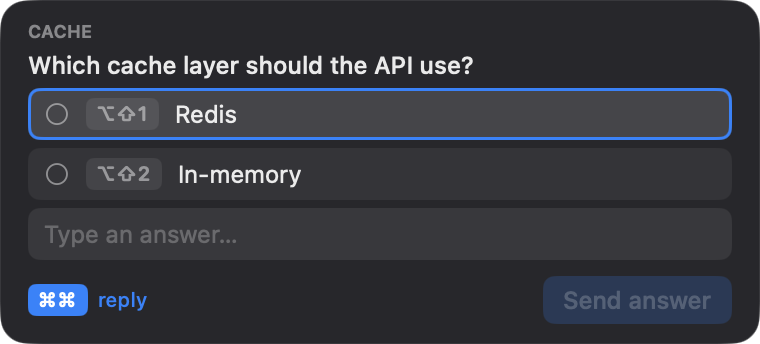
It never moves your keyboard focus. You choose when to go back. With Pro, Command+Return takes you to the exact tab or pane that needs you.
| Free | Pro | |
|---|---|---|
| Live status on the rail | Yes | Yes |
| Completion and input chimes | Yes | Yes |
| macOS notifications | Yes | Yes |
| Flyout beside the session, Read & reply | No | Yes |
| Return to the app, tab, or pane | No | Yes |
| Peek, notification inbox | No | Yes |
Returning to the exact tab
With Pro, the jump goes to the exact tab or pane in Ghostty, iTerm2, cmux, WezTerm, kitty, Warp, Apple Terminal, tmux, and Zellij, among others. Alacritty and Hyper support window-level return.
To answer without leaving your app, double-tap Command, type, and press Enter. back2vibing needs Accessibility access to return to the right window, tab, or pane.
Setup
Run brew tap builtby-win/back2vibing, then brew install --cask back2vibing. Open the app and grant Accessibility access. New installs include a 14-day Pro trial. Pro is a one-time $19 lifetime license.
Start a Claude Code session and check the Agents page: the integration should say Active. If it says Needs setup, use the repair action and start a fresh session. Existing sessions may not pick up a new hook.
brew tap builtby-win/back2vibing
brew install --cask back2vibing
Try back2vibing
Every new install includes a 14-day Pro trial, and Pro is a one-time $19 lifetime license.
$
brew tap builtby-win/back2vibing https://github.com/builtby-win/back2vibing && brew install --cask back2vibing Install via Homebrew macOS
Frequently asked questions
Can I get a notification when Claude Code finishes on a Mac?
Yes. Use the terminal bell, a Stop hook, or back2vibing. The free tier plays a completion chime and sends macOS notifications.
Will clicking the notification take me to the right tab?
It depends on the terminal and how the banner was made. In our Ghostty test, a terminal-made banner focused the right split. It never picks a tmux pane, and we did not test hook banners. With back2vibing Pro, a jump returns you to the exact tab or pane. The free tier notifies but does not return.
Does the Notification hook fire the moment Claude Code finishes?
No. idle_prompt fires about 60 seconds after Claude finishes and you have not typed. permission_prompt fires after about six seconds. For the instant a turn ends, use a Stop hook.
Why do bells and hooks not help inside tmux?
The bell comes from the terminal, and tmux needs allow-passthrough. A pane in a window you are not viewing still sends nothing. A hook runs but does not know which pane you are in.
Can I answer Claude Code from the banner?
No, an osascript banner is read-only. With Pro, the Read & reply flyout lets you answer from the overlay.
Does back2vibing steal focus when the agent finishes?
No. The flyout is the alert. You jump when you are ready.
Keep reading
- Codex notifications on Mac
- How to never lose a Claude Code tab
- Why agent notifications pile up
- Stop watching terminal spinners
- back2vibing for Claude Code
- Know when Claude Code finishes
- Claude Code notifications on Mac
- Switch between Claude Code sessions
- Sound and dictation (docs)
- Session Rail (docs)
- Pricing