The best tools for managing multiple AI coding agents
2026-11-14 · 4 min read
Most tools here help you run agents. Few help with the moment after: a notification says an agent finished. Where a click lands depends on the terminal and how the banner was made. In Ghostty, a banner the terminal makes itself focused the right split in our test; in tmux it never picks the pane. Banners from hooks and scripts we did not test. This roundup sorts tools by the problem they solve and says when back2vibing, our overlay, is not the right pick.
- Isolation: Conductor, Orca, Claude Squad. Hosting: cmux, Warp. Persistence: tmux, herdr.
- Hooks tell you something finished. We did not test where a hook banner's click lands.
- back2vibing shows every session's state on one rail, and with Pro jumps to the exact tab or pane.
Pick by the problem that hurts
Four separate problems show up with several agents. They overwrite each other in one checkout. You lose which terminal is which. You miss when one finishes. And you cannot get back to the right pane.
No tool fixes all four. Expect to combine two.
| Problem | Category | Examples |
|---|---|---|
| Agents collide | Workspace and worktree managers | Conductor, Orca, Claude Squad |
| Which terminal is which | Agent terminals | cmux, Warp |
| Sessions must survive | Multiplexers and runtimes | tmux, herdr |
| Knowing one finished | Hooks and scripts | Claude Code hooks |
| Getting back to it | Overlay trackers | back2vibing |
Workspace and worktree managers
Each agent gets its own copy of the repo, usually a git worktree. Most also bundle diff review and merging.
- Trade-off: you work inside their app or TUI.
- Conductor or Orca for a GUI; Claude Squad for a small keyboard-driven tool.
| Tool | What its own pages say |
|---|---|
| Conductor | Mac app. Parallel Claude Code, Codex and Cursor agents in isolated workspaces; review and merge. |
| Orca | Orchestrator running agents in parallel worktrees, as chat or terminal. Diff review, GitHub and Linear, CLI, mobile app, SSH hosts. macOS, Windows, Linux. |
| Claude Squad | Terminal app using tmux and git worktrees, one branch per task. Manages Claude Code, Codex, Gemini and others such as Aider. AGPL-3.0. |
Terminals built for agents
cmux is an open-source, Ghostty-based macOS terminal. Its README says tabs show branch, PR status and the latest notification text, panes get a ring when an agent needs attention, and `cmux notify` can be wired into agent hooks.
Warp lists vertical tabs with branch and PR metadata, plus notifications when an agent needs approval or finishes.
Trade-off: status lives inside that terminal. Agents in another terminal, on another machine or in a desktop app are outside it.
Multiplexers and runtimes
tmux keeps sessions alive through a closed window or dropped SSH connection. It does not know what an agent is, so it will not tell you one is waiting.
herdr calls itself the runtime your coding agents live on. It keeps terminals in a background server and marks each pane working, blocked or idle. Open source, Apache 2.0. Status only covers panes it owns.
Hooks and scripts
Claude Code hooks run at lifecycle points, including `Stop` and `Notification`. Point one at `osascript`, `terminal-notifier` or `afplay` and you get a banner or a sound.
It works for one or two agents. With six panes it does not tell you which one called, and it does not take you there.
osascript -e 'display notification "Claude finished" with title "Claude Code"'Overlay tracker: back2vibing
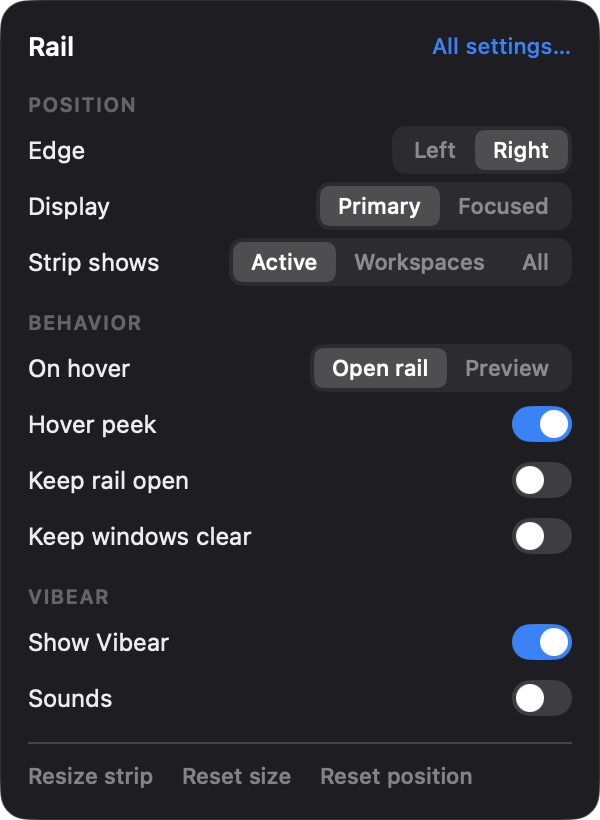
back2vibing does not host agents, isolate repos or replace your terminal. It is a macOS overlay that watches the agents you already run and shows each on a Session Rail: needs you, working, ready or blocked.
- Pro returns to Ghostty, iTerm2, cmux, WezTerm, kitty, Warp, Orca, the Herdr app, tmux and Zellij, plus Conductor workspaces and Codex Desktop threads.
- 14-day Pro trial; Pro is a one-time $19 lifetime purchase.
- Trade-off: macOS only. No worktrees, merging or persistence.
| Free GUI tier | Pro | |
|---|---|---|
| Rail, live status, sound, macOS notifications | Yes | Yes |
| Return to exact tab or pane | No | Yes |
| Inbox, flyouts, chat, SSH and CLI workflows | No | Yes |
Which to pick
A worktree manager and an overlay do not compete. back2vibing documents returning to Conductor workspaces and Orca panes, so isolate with one and track with the other.
| Situation | Pick |
|---|---|
| Agents edit the same files | Conductor, Orca, Claude Squad, or plain worktrees |
| One app for isolation, review, merge | Conductor or Orca, not back2vibing |
| Happy to switch terminals | cmux or Warp |
| SSH, or sessions that outlive your laptop | tmux or herdr; back2vibing adds tracking (Pro) |
| One agent, one terminal | A hook script |
| Many agents across windows, and you keep losing track of them | back2vibing |
| Windows or Linux | Orca; back2vibing is macOS only |
Try back2vibing
Every new install includes a 14-day Pro trial, and Pro is a one-time $19 lifetime license.
$
brew tap builtby-win/back2vibing https://github.com/builtby-win/back2vibing && brew install --cask back2vibing Install via Homebrew macOS
Frequently asked questions
What is the best tool for managing multiple AI coding agents?
It depends on the problem. Conductor, Orca or Claude Squad for isolation, tmux or herdr for persistence, back2vibing for status and returning to the right pane. Most people combine two.
Do I need git worktrees to run agents in parallel?
Only if they touch the same repo. Conductor, Orca and Claude Squad automate worktrees. back2vibing does not create them.
Can back2vibing work alongside Conductor, cmux or Orca?
Yes. Its docs list them as targets it can return you to with Pro. It tracks the agents inside them instead of replacing them.
Is a notification script enough?
For one or two agents, often. Past that, it says something finished but not which pane, and it does not jump you there.
Which of these are free?
Orca, cmux, Claude Squad, herdr and tmux publish open-source code. back2vibing has a free GUI tier after a 14-day Pro trial; Pro is a one-time $19. Check each site for current pricing.
Keep reading
- How to run multiple Claude Code agents at once
- back2vibing vs Conductor: a workspace manager or an overlay
- back2vibing vs Orca: an overlay or a workspace app
- back2vibing vs cmux: a terminal or an overlay
- back2vibing vs Herdr: a terminal multiplexer for agents versus an overlay
- Claude Code hooks vs a session tracker: when a script is enough
- The best terminal setup for AI coding agents
- How to track all your AI coding agents in one place
- back2vibing for multiple agents
- back2vibing alternatives
- Beyond Claude Code hooks
- back2vibing with tmux
- back2vibing over SSH
- Pricing
- Supported agents and apps
- The Session Rail