back2vibing vs Conductor: a workspace manager or an overlay
2026-11-14 · 3 min read
Conductor gives each agent task its own workspace, branch and review path. back2vibing does a different job: it shows every session's state on one rail, and with Pro jumps to the exact session. The free tier notifies; returning to the session is Pro. back2vibing can launch Conductor workspaces and return to them, so you do not have to choose.
- Conductor isolates and reviews work. back2vibing tracks sessions and returns you to them.
- back2vibing returns to the exact Conductor workspace and session with Pro.
- The free tier shows status and notifies. It does not return you.
What each one is
Per its docs, Conductor runs Claude Code, Codex, Cursor and OpenCode in parallel on your Mac. Each task gets its own workspace, branch, terminal and diff, created with Git worktrees. You work inside its app and use it to review, open a pull request, merge and archive.
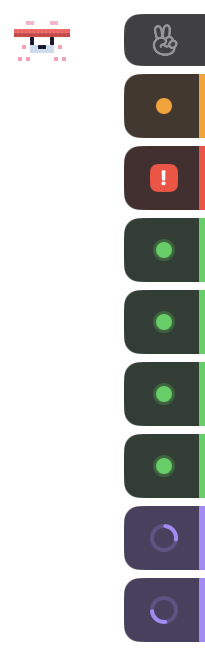
back2vibing is an overlay. Agents keep running in the terminals and apps you already use, and the Session Rail shows one tab per session with a status. It does not replace your terminal or move your repos.
| Conductor | back2vibing | |
|---|---|---|
| Role | Where the work happens | Where you find out and get back |
| Isolation | Workspace and branch per task | Own workspaces, free tier |
| Diff review, PR, merge | Built in | Not a review surface |
| Return to exact session | n/a | Pro, including Conductor workspaces |
Pick by problem
Isolation and review: Conductor. Knowing which session needs you and getting back to it, across Ghostty, iTerm2, tmux, SSH or a desktop app: back2vibing.
back2vibing has its own workspaces too, free: press n in the rail quick-pick, click the + chip, or choose New workspace in Chat. Optional scripts run from .back2vibing/settings.toml (setup, pr_created, pre_merge, merged, archive). It does not give you a diff viewer or merge flow.
Using them together
In Settings > Workspaces, Create workspace files with lists Conductor. Conductor creates the workspace and starts its agent; back2vibing passes it the repository and an optional first prompt.
With Pro, back2vibing returns you to the exact Conductor workspace and session. Keep the target open while the agent runs. If the exact target is gone, it falls back to the captured application window.
# Settings > Workspaces > Create workspace files with
Conductor
Cost
14-day Pro trial, then the free GUI tier. Pro is a one-time $19 lifetime purchase. Returning to a Conductor workspace is Pro; creating workspaces is free. For Conductor pricing, see its site.
Try back2vibing
Every new install includes a 14-day Pro trial, and Pro is a one-time $19 lifetime license.
$
brew tap builtby-win/back2vibing https://github.com/builtby-win/back2vibing && brew install --cask back2vibing Install via Homebrew macOS
Frequently asked questions
Is back2vibing a Conductor alternative?
Partly. For status, notifications and returning to the right session, yes. For a diff viewer and pull request flow, no. The two work together.
Can I use back2vibing with Conductor?
Yes. back2vibing can use Conductor to create workspaces, and with Pro it returns you to the exact Conductor workspace and session.
Does back2vibing use Git worktrees like Conductor?
Each back2vibing workspace gets its own checkout and branch, and Pro includes worktree discovery. Conductor documents using Git worktrees.
Do I need Conductor to use back2vibing?
No. It works with the terminals and agents you already use. Conductor is optional.
Does the free tier take me back to Conductor?
No. The free tier shows status and notifies. Returning to the exact workspace is Pro.
Keep reading
- back2vibing vs Orca: an overlay or a workspace app
- back2vibing vs Herdr: a terminal multiplexer for agents versus an overlay
- Parallel coding agents without losing context
- How to run multiple Claude Code agents at once
- The best tools for managing multiple AI coding agents
- back2vibing alternatives and comparisons
- Run multiple agents with back2vibing
- Pricing
- Docs: Workspaces
- Docs: Agent support
- Docs: Session Rail