Track Cursor agent sessions and get back to the right one
2026-11-14 · 3 min read
A notification says an agent finished, but with two Cursor projects and a few terminal agents open, you still have to work out which one it was and where it is. Banners time out or stack. back2vibing shows every session on one rail and, with Pro, returns you to the right one.
- Cursor Desktop is supported. Each session is a tab on the Session Rail.
- Free: status, sound and macOS notifications. It notifies but does not return you to the session.
- Pro: return to the exact Cursor project session, or the exact terminal tab or pane.
Why Cursor gets lost
One Cursor window is easy to follow. Two projects plus terminal agents is not. Cursor cannot see your terminal agents, and your terminal cannot see Cursor.
So you cycle through windows to find whichever agent has waited longest.
Setup
Cursor is one of the agents back2vibing has a lifecycle integration for. The docs cover Cursor Desktop only, not a Cursor command-line integration.
Open Agents in the app and install the Cursor bridge. A working integration shows Active. If it shows Needs setup, use the repair action. Each Cursor session then becomes a tab on the rail.
Read the rail
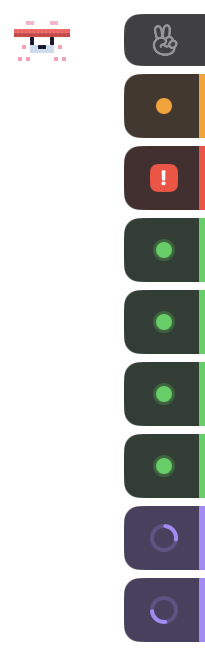
When a session finishes, its tab goes green and you get a completion sound and a macOS notification. The free tier keeps these after the trial.
| Mark | Meaning |
|---|---|
| Purple spinner | Working |
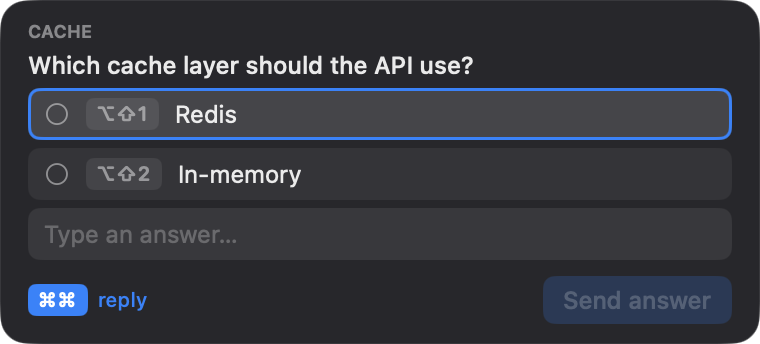
| Amber pulsing dot | Needs you: a question or a permission |
| Green dot | New response ready |
| Red exclamation mark | Blocked or failed |
| No highlight | Idle |
Getting back to the exact session
Returning to a session is Pro. With the Cursor bridge installed, back2vibing returns to the captured project session. Without it, you land in the Cursor window.
That matters with more than one project open. Window focus cannot tell which project finished. The bridge supplies the project session.
Command-Return jumps to the next agent that needs you. Option+1 through 9 peeks a numbered session without moving keyboard focus.
| Free | Pro | |
|---|---|---|
| Status, sound, macOS notification | Yes | Yes |
| Return to Cursor project session | No | Yes |
| Return to exact terminal tab or pane | No | Yes |
| Flyouts, peek, notification inbox | No | Yes |
Cursor and terminal agents together
Claude Code in Ghostty, Codex in tmux and Cursor on a third project all show as tabs on the same rail. The rail can shrink to a thin line with one colored segment per agent.
Pro returns to exact tabs or panes in Ghostty, iTerm2, cmux, WezTerm, kitty, Warp, Apple Terminal, Orca, the Herdr app, tmux and Zellij. See [multi-agent workflows](/multi-agent/) and [know when Claude Code finishes](/know-when-claude-code-finishes/).

Check it works
Start a session, send a short prompt, switch away, and confirm the finish event returns you to the expected target. If nothing arrives, check Agents for Needs setup.
Try back2vibing
Every new install includes a 14-day Pro trial, and Pro is a one-time $19 lifetime license.
$
brew tap builtby-win/back2vibing https://github.com/builtby-win/back2vibing && brew install --cask back2vibing Install via Homebrew macOS
Frequently asked questions
How do I know when the Cursor agent finishes?
Track it in back2vibing. The session tab turns green and you get a sound and a macOS notification. The free tier keeps these after the 14-day Pro trial.
Does clicking a notification take me to the Cursor session?
It depends on the terminal and how the banner was made, and we did not test Cursor banners. The free tier notifies but does not return you. Pro returns you to the captured project session with the Cursor bridge, or to the Cursor window without it.
Does back2vibing track the Cursor CLI?
The docs only describe Cursor Desktop for this integration. Check Agents in the app to see what is Active on your machine.
Do I need the Cursor bridge?
No, but it improves where you land. With it you return to the project session. Without it you return to the Cursor window.
What does it cost?
A 14-day Pro trial, then a free tier with status, notifications and sounds. Pro is a one-time $19 lifetime purchase.
Keep reading
- How to track all your AI coding agents in one place
- Stop watching terminal spinners
- Parallel coding agents without losing context
- How to run multiple Claude Code agents at once
- The best tools for managing multiple AI coding agents
- back2vibing for Cursor
- Multi-agent workflows
- Know when Claude Code finishes
- Pricing
- Supported agents and apps
- Session Rail