Keyboard shortcuts for AI coding agent workflows
2026-11-14 · 4 min read
A notification is not guaranteed to put you in the right window, and with many sessions you end up hunting. Three keys help: one to jump to the agent that needs you, two to open the rail and the switcher. Here are the defaults.
- Command-Return: next agent that needs you (fixed, Pro).
- Option+Space: rail. Option+Tab: Agent Pane Switcher (Pro).
- Command-Shift-A/S/D answer permission prompts (Pro).
Jump and navigate
Command-Return cannot be rebound. It takes you to the next agent that needs you, from anywhere. The flyout does not move focus, so you keep typing until you choose to look.
After Option+Space, a number picks a workspace, the arrow keys or j and k pick a session, Enter opens it, slash searches, and Escape closes. The leader is free.
| Shortcut | Action | Tier |
|---|---|---|
| Option+Space | Session rail leader | Free |
| Option+Tab | Agent Pane Switcher | Pro |
| Command-Return | Next agent that needs you | Pro |
| Option+1 to 9 | Peek a numbered session | Pro |
Answer permission prompts
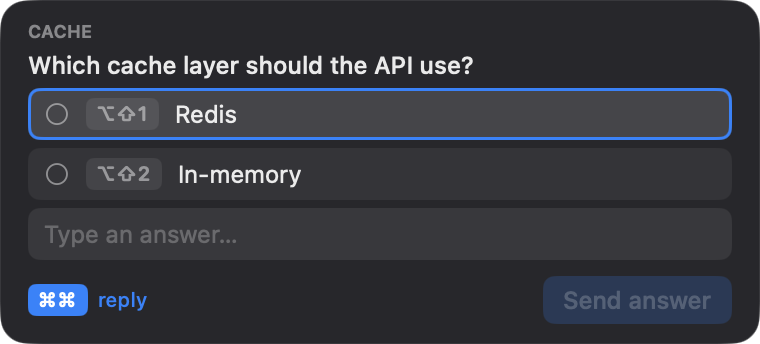
The prompt panel is Pro and experimental. The docs list Claude Code and OpenCode as supported.
Other keys work once the panel is armed. Double-tap Command by default, or change the trigger, or turn arming off. While armed, a, s, d, and g do the same as the chords, j and k move between options, and Enter submits.
| Shortcut | Action |
|---|---|
| Command-Shift-A | Allow once |
| Command-Shift-S | Allow always |
| Command-Shift-D | Deny |
| Command-G | Open the session that is asking |
Global shortcuts and rebinding
Global toggle and Chat palette ship unset. Both are Pro. Watch desktop region defaults to Command-Shift-Y and is experimental.
Rebind in Settings, Shortcuts, or from the terminal. If a chord is taken, the command fails with the reason and nothing changes.
b2v shortcuts list
b2v shortcuts set agent-pane-switcher Alt+Tab
b2v shortcuts reset all
b2v shortcuts export
Try back2vibing
Every new install includes a 14-day Pro trial, and Pro is a one-time $19 lifetime license.
$
brew tap builtby-win/back2vibing https://github.com/builtby-win/back2vibing && brew install --cask back2vibing Install via Homebrew macOS
Frequently asked questions
What jumps to the agent that needs me?
Command-Return. It is fixed and cannot be rebound. It is a Pro action.
How do I approve a permission request from the keyboard?
Command-Shift-A allows once, Command-Shift-S allows always, Command-Shift-D denies. You can rebind them. The prompt panel is Pro.
Can I change the defaults?
Yes, in Settings, Shortcuts, or with b2v shortcuts. Changes apply immediately.
What opens the rail from the keyboard?
Option+Space by default.
Does the Agent Pane Switcher replace Command-Tab?
No. It sits beside it and reaches sessions in tmux panes and SSH hosts.