OpenCode notifications on Mac: free setup and the way back
2026-11-14 · 4 min read
A plugin can tell you OpenCode finished. Where the click lands depends on your terminal and how the banner was made, and in tmux it cannot pick the pane. With many sessions across terminals, banners time out or stack. back2vibing shows every session on one rail, and Pro returns you to the exact tab or pane.
- Free: a plugin that runs osascript or afplay on session.idle.
- It alerts you. Where a click lands depends on the terminal, and in tmux it cannot pick the pane.
- back2vibing free tier notifies and shows status. Pro returns you to the exact tab or pane.
Free: a session.idle plugin
OpenCode loads plugins from .opencode/plugins/ in a project, or ~/.config/opencode/plugins/ for all projects. A plugin exports Plugin.define with an id and a setup function.
In setup, ctx.event.subscribe() gives you the event stream. When event.type is session.idle, run a macOS command. The docs example only logs a message, so the notification is yours to write.
Spawn osascript for a banner or afplay for a sound, and abort the subscription in the cleanup function setup returns. The docs have no osascript recipe, and they describe a V1 to V2 plugin migration, so expect to maintain it.
| Item | Value |
|---|---|
| Project plugins | .opencode/plugins/ |
| Global plugins | ~/.config/opencode/plugins/ |
| Finish event | session.idle |
| Banner | osascript display notification |
| Sound | afplay |
What a click does
Where a click lands depends on the terminal and how the banner was made. We did not test OpenCode or script-made banners. In Ghostty, a terminal-made OSC 9 banner from other agents focused the exact split, and in tmux it never picks the pane.
A banner is also read-only. If OpenCode is waiting on a permission or a question, you still go to the terminal and answer there. Old banners time out or pile up when several agents run.
A terminal bell is the zero-code fallback. It only helps if your terminal turns it into a sound, and it does not tell you which pane rang.
What back2vibing adds
back2vibing has a lifecycle integration for OpenCode, so there is no plugin to write. Each session is a tab on the Session Rail. Amber pulsing dot: needs you. Purple spinner: working. Green: finished. Red: blocked or failed.
The free tier gives you the rail, a completion sound and macOS notifications. It notifies and never moves your keyboard. Pro returns you to the exact tab or pane.
| Free | Pro | |
|---|---|---|
| Status on the rail | Yes | Yes |
| Sound and macOS notification | Yes | Yes |
| Return to exact tab or pane | No | Yes |
| Flyout with Read & reply | No | Yes |
| Prompt Panel (experimental) | No | Yes |
| Peek on hover, notification inbox | No | Yes |
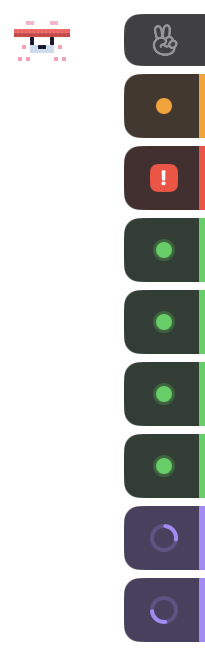
Returning to the right pane
With Pro, picking an OpenCode session returns you to the tab or pane it ran in. Exact return works in Ghostty, iTerm2, cmux, WezTerm, kitty, Warp, Apple Terminal, Orca, the Herdr app, tmux and Zellij. Alacritty returns to the window.
Pro can also forward lifecycle events from remote hosts over SSH.
Answering permission prompts
The Prompt Panel is an experimental Pro feature for supported Claude Code and OpenCode permission requests. Double-tap Command to arm it. Number keys pick an option, and decision keys allow once, allow always, or deny. You can use back2vibing without it.
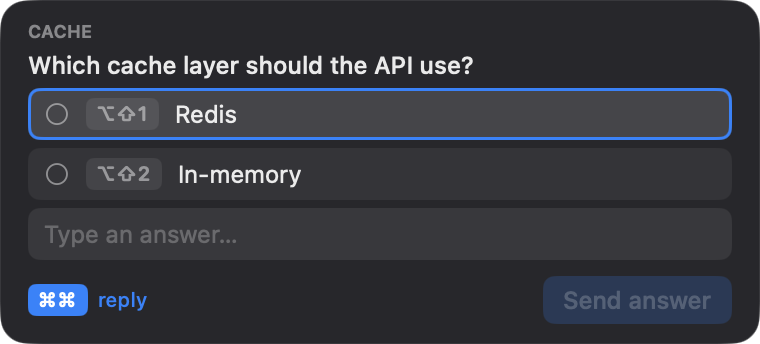
Set it up
Install back2vibing and grant Accessibility access. New installs include a 14-day Pro trial. Pro is a one-time $19 license.
Open Agents in the app. OpenCode should show Active. If it shows Needs setup, use the repair action. Then start a session, send a short prompt, switch away, and confirm the finish event returns you to the right place.
Try back2vibing
Every new install includes a 14-day Pro trial, and Pro is a one-time $19 lifetime license.
$
brew tap builtby-win/back2vibing https://github.com/builtby-win/back2vibing && brew install --cask back2vibing Install via Homebrew macOS
Frequently asked questions
Does OpenCode send macOS notifications on its own?
Its TUI has an attention setting in tui.json, but in our Ghostty test it printed only a terminal-support query and no banner appeared. A session.idle plugin works in any terminal.
Does clicking the notification take me to the OpenCode session?
It depends on the terminal and how the banner was made, and we did not test OpenCode banners. In tmux a click does not pick the pane. back2vibing Pro returns you to the exact tab or pane. The free tier notifies but does not return you.
How do I get OpenCode notifications for free?
Write a plugin that subscribes with ctx.event.subscribe() and runs osascript or afplay when event.type is session.idle. back2vibing free also notifies, with no plugin.
Can I answer OpenCode from a notification?
Not from a plain banner. With Pro, Read & reply in back2vibing lets you answer from a flyout, and the experimental Prompt Panel handles permission requests.
Does it work with OpenCode inside tmux?
Yes. Pro returns you to the exact tmux or Zellij pane. The free tier shows status and notifies.
Keep reading
- Antigravity CLI notifications on Mac: free setup and the way back
- Codex notifications on Mac
- Claude Code notifications when it finishes
- How to track all your AI coding agents in one place
- Stop watching terminal spinners
- back2vibing for OpenCode
- Supported agents and apps
- Session Rail
- Audio and alerts
- Keyboard shortcuts
- tmux and multiple agents
- Pricing